User guide
Before using PyAligner, do not forget to install it as explained in the Installation section.
Warning
Do not forget to activate the virtual environment before running any command:
mamba activate pyaligner_env
Graphical User Interface
The graphical user interface (GUI) is the main way to interact with the software.
pyaligner gui
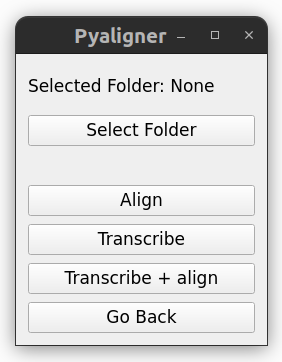
All the commands will perform the specified tasks to all the files in the specified folder and its subfolders.
Command Line Interface
Pyaligner offers three main features: transcription, alignment and both automatically. You can see all the available commands by running:
pyaligner
All the commands will perform the task to all the files in the specified folder and its subfolders.
Transcription
Automatically transcribe all audio files inside a folder (and nested subfolders) into text files:
pyaligner transcribe <input_folder>
You can get more information with:
pyaligner transcribe --help
Alignment
Automatically align all audio files with their corresponding transcription text files:
pyaligner align <input_folder> <language>
The language parameter is necessary. Check available dictionaries and acoustic models
The input folder must contain audio files and their corresponding transcription
text files. The transcription text files must have the same name as the
audio files, but with a different extension.
For example, if you have an audio file called audio.wav, the transcription
file must be called audio.txt. You can get more information with:
pyaligner align --help
Transcription and Alignment
Automatically perform both transcription and alignment, including language detection:
pyaligner auto <input_folder>
The optional parameter --language can be used to specify the language for
the alignment. If not specified, the language will be detected automatically.
pyaligner auto <input_folder> --language <language>
You can get more information with:
pyaligner auto --help
Renaming files
As an additional feature, you can rename all the audio files inside a folder
and its subfolders to match the pattern
<folder_name>_<file_number>.<extension>. For example, if you have a folder
called my_folder with the following files: this_audio.wav,
that_audio.wav, another_audio.wav, the files will be renamed
to my_folder_00001.wav, my_folder_00002.wav,
my_folder_00003.wav.
pyaligner rename <input_folder>
You can get more information with:
pyaligner rename --help